You have the photos. You have the order confirmation. You may even have screenshots of the conversation where you reported the problem. So why does putting together a simple complaint still feel like assembling a detective board?
- Start With the Question Your Photos Need to Answer
- Build the Evidence Set Before You Build the PDF
- Give Every Image a Place in the Story
- Turn the Prepared PNG Files Into One Shareable PDF
- Run a Five-Minute Review Before Sending
- Make the File Easy to Review, Not Just Easy to Open
Because evidence scattered across a dozen image files is harder to follow than a document that tells a clear story. A damaged package, a missing item, a defective product, or a delivery dispute can involve several photos that make perfect sense to you but leave someone else wondering what happened first and what each image is supposed to prove.
Turning those images into a PDF can make the information easier to review. But the real win isn't having fewer attachments. It's creating a document that helps another person understand the situation without having to guess.
Start With the Question Your Photos Need to Answer
Before opening a conversion tool, identify the specific issue you're trying to explain. Are you documenting damage that was visible when a package arrived? Showing that an item differed from the product description? Recording missing components or a delivery problem? Your answer determines which images belong in the final document and which ones are just taking up space.
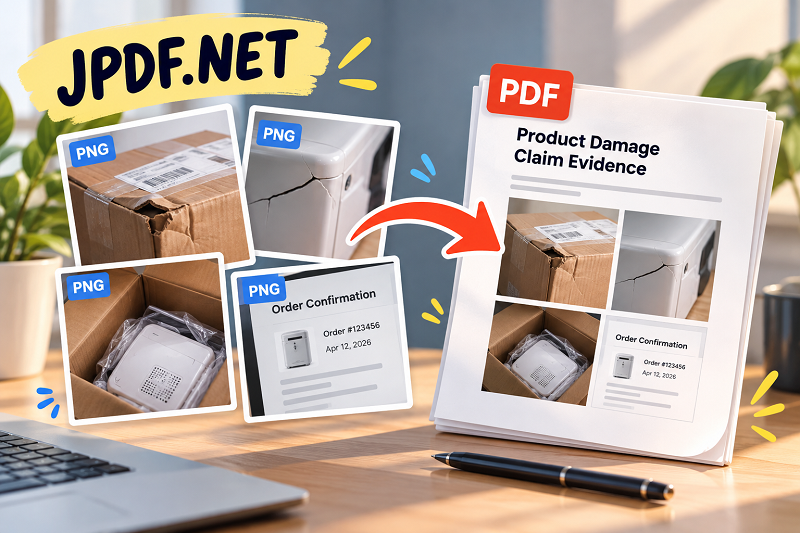
Imagine receiving a kitchen appliance with a cracked housing. You might have a photo of the shipping box, another showing the damaged corner, a close-up of the crack, and a screenshot of the original order. Together, these images provide more context than four unrelated attachments. The box establishes the delivery context, the close-up shows the problem, and the order record helps identify the purchase.
Don't force every image into the PDF just because it exists. Duplicate shots, unrelated screenshots, and photos that don't help explain the issue can distract from the important details. Keep the original files, though. Selecting a smaller, more relevant set for presentation doesn't mean deleting the rest of your records.
Build the Evidence Set Before You Build the PDF
A useful evidence package usually contains three kinds of material: context, details, and supporting records. Context images show the overall situation. Detail images capture the specific defect, discrepancy, or missing component. Supporting records may include receipts, order confirmations, delivery information, or relevant communications.
The balance matters. A close-up of a damaged surface might clearly show a scratch, but without a wider shot, the viewer may not know which part of the product they're looking at. Conversely, a beautiful wide-angle photo of the entire item may fail to reveal the defect that prompted the complaint. Choose images that work together rather than compete for attention.
Next, check that each file is usable. Open the images at a normal viewing size and look for blur, glare, cropped edges, unreadable text, or details hidden by shadows. If an image needs explanation, make a brief note outside the original image or add a clearly labeled caption when preparing the document. Avoid altering an image in ways that could misrepresent the underlying event, and retain the original, unedited version for reference.
One more thing: screenshots can contain more information than you intended to share. Review names, addresses, phone numbers, payment details, and unrelated messages before assembling the document. Remove or obscure unnecessary sensitive information from the copy you plan to share when appropriate, while preserving the original records separately.
Give Every Image a Place in the Story
A good PDF doesn't need a complicated design. It needs a sequence that makes sense.
For a damaged-delivery complaint, you could begin with a brief description of the order or incident, follow with a photo showing the package as received, then show the damaged item from a wider angle and in close-up. Finish with relevant supporting records, such as the order confirmation or a message reporting the problem. If the dispute concerns a different issue, arrange the images according to that situation instead.
Think of each page as answering a small question. What arrived? What was wrong? How can the issue be identified? Which record connects the evidence to the purchase? This approach helps readers move through the document without having to reconstruct the timeline themselves.
If the order of events matters, make that order clear. Use short, factual labels such as "Package exterior," "Damage to left panel," or "Order confirmation." Avoid dramatic descriptions, unsupported accusations, or captions that claim more than the image demonstrates. A straightforward presentation is easier to evaluate than one overloaded with commentary.
There is no universal page sequence for every dispute. Follow any instructions provided by the seller, payment provider, delivery company, or complaint-handling organization. If a specific form, file format, or submission method is required, that requirement takes priority over your preferred layout.
Turn the Prepared PNG Files Into One Shareable PDF
Once your images are selected and arranged, combining them into a single PDF gives the reviewer one document to open instead of a pile of separate attachments. It also makes it easier to keep related images together when you email the complaint, upload supporting documents, or save a record for later reference.
You can use a png to pdf converter free to turn your prepared PNG images into a PDF without paying for a conversion tool. Before you begin, make sure the images are the ones you actually want to include and that their filenames or preparation order make the intended sequence clear. Depending on the tool, you may need to arrange the files before conversion or verify the page order afterward.
Once the PDF is created, don't assume the job is finished. Open the resulting file and inspect every page. Check whether the images appear in the intended sequence, whether any pages are rotated incorrectly, and whether small details remain legible. A conversion that technically succeeds can still produce a document that's frustrating to review.
Also consider the recipient's submission requirements. Some systems impose file-size limits, restrict the number of pages, or request supporting records separately. A single PDF is convenient when accepted, but combining everything into one file isn't automatically the right choice for every process.
Run a Five-Minute Review Before Sending
Give the finished document one final review from the recipient's perspective. Imagine opening it without knowing anything about the incident. Can you identify the relevant purchase or event? Can you understand why each image is included? Can you see the important details without excessive zooming? If the answer to any of these questions is no, make the necessary adjustments before sending.
Check for missing pages, accidental duplicates, incorrect orientation, clipped content, and unreadable screenshots. Confirm that the document doesn't include unrelated personal information or private conversations that aren't necessary for the complaint. Use a descriptive filename that helps distinguish the document from other files, such as Damaged-Delivery-Evidence.pdf, rather than something vague like final-final2.pdf.
Keep your original PNG images, receipts, and relevant communications in a separate, organized location. The PDF is your presentation copy, not a replacement for the underlying records. Preserving the originals gives you a reliable reference if someone requests a specific image or additional documentation later.
Finally, make sure the document follows the recipient's instructions. Some disputes require original photographs, additional forms, specific evidence categories, or other verification. A well-organized PDF can make information easier to review, but it doesn't guarantee that a claim will be accepted or that the document will meet every formal evidence requirement.
Make the File Easy to Review, Not Just Easy to Open
When you're preparing evidence for a dispute, the goal isn't to create the longest document or attach every photo you've ever taken. It's to present the relevant information in a way that another person can follow. Select the right images, preserve their context, arrange them in a meaningful sequence, and inspect the finished file before sharing it.
A little preparation can save both you and the recipient from unnecessary back-and-forth. Your photos already contain the details of what happened. A well-organized PDF simply makes those details easier to find, understand, and review.