A PDF can be perfectly organized and still be completely wrong for the person receiving it. Think about a project report containing an executive summary, financial figures, technical specifications, meeting notes, and several appendices. As a master document, everything belongs together. But send that entire file to a client, and they may only care about the summary and final proposal. Send it to the finance team, and most of the technical material becomes noise. Send it to a developer, and the budget section might be irrelevant. That is the awkward reality of many PDFs: the document was designed as one file, but the workflow rarely is. Instead of repeatedly telling people which pages to read, it can make more sense to turn one large document into several focused files. The goal isn't simply to remove pages. It's to create documents that are easier to share, upload, review, and actually use.
- The Problem Isn't the PDF — It's the Audience
- Four Signs That One PDF Has Become Too Many Documents
- Think in Deliverables, Not Page Numbers
- A Simple Workflow for Turning One PDF Into Several Files
- Don't Make These Four Splitting Mistakes
- When an Online PDF Splitter Makes More Sense
- The Final Test: Can Someone Understand the New File Without You?
- One Source File Can Become Several Better Documents
The Problem Isn't the PDF — It's the Audience
A single PDF can serve multiple audiences at the same time, but that doesn't mean every audience needs the same information. Imagine a 60-page project document. Your client needs the proposal, timeline, and final pricing. Your internal team needs the technical specifications. Finance needs the budget and payment schedule. Management wants the executive summary and key performance figures. Sending everyone the same 60-page file creates unnecessary friction. People have to search for relevant sections, skip through pages they don't need, and sometimes download a large document simply to access a few important pages. The smarter question isn't, "How can I make this PDF smaller?" It's, "What document does each person actually need?" That small change in perspective can completely change how you manage PDFs.
Four Signs That One PDF Has Become Too Many Documents
You probably have a good candidate for splitting when the same PDF keeps being used in completely different ways. Different people may need completely different pages. The same file might also be uploaded to several systems where only a specific section is relevant. Sometimes a document combines customer-facing material with internal notes, pricing details, or operational information that shouldn't be shared with everyone. And there's one especially obvious warning sign: you keep telling people exactly which pages to read. If your message starts sounding like, "Please look at pages 4–7, skip pages 8–15, then check page 22," the recipient probably shouldn't have to navigate the master document in the first place.
Think in Deliverables, Not Page Numbers
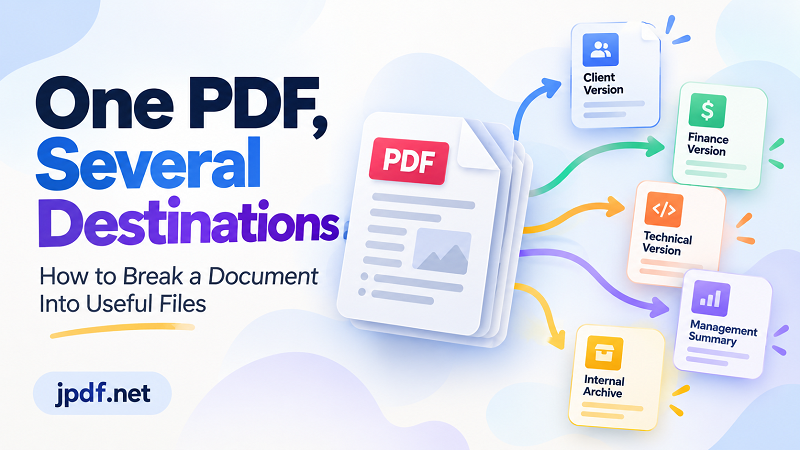
This is where PDF organization gets more interesting. Instead of looking at a document as a pile of numbered pages, think about the actual deliverables hidden inside it. A large project report might contain several smaller documents waiting to be separated: a Client Version, Finance Version, Technical Version, Management Summary, and Internal Archive. Each version has a purpose, audience, and sharing context. This approach also makes future work easier. When someone asks for the financial information three weeks later, you don't have to reopen the original document and figure out which pages contain the relevant numbers. You already have a focused file ready to go. The PDF hasn't changed. Your workflow has.
A Simple Workflow for Turning One PDF Into Several Files
Start by protecting the original document. Keep the complete PDF as your master copy and work from it rather than repeatedly modifying the only version you have. Next, identify the purpose of every new file and decide who will use it before selecting pages. Then choose the pages that belong together, making sure the new document feels intentional rather than like a random collection of extracted pages. After exporting, read each new file from beginning to end. A page that makes perfect sense inside the original document might become confusing when separated from the pages around it. Finally, give every file a useful name. Report-Finance.pdf is far more helpful than Document-2.pdf, especially when several versions are being shared with different people.
Don't Make These Four Splitting Mistakes
One easy mistake is splitting the original instead of creating copies. Your master document should remain intact so you can produce another version whenever needed. Another is removing context that the reader needs. A chart on page 12 might depend on the explanation on page 11, while a signature page might only make sense when accompanied by a preceding agreement. You should also check appendices, tables, references, and supporting pages before deciding what belongs in a new file. And don't underestimate filenames. Creating final.pdf, final2.pdf, final-new.pdf, and final-new-new.pdf may technically solve today's problem while creating tomorrow's. A useful filename should tell the recipient exactly what the file is for.
When an Online PDF Splitter Makes More Sense
Not every PDF task deserves a software installation or a complicated workflow. If you only need to create a few focused files from a larger document, an online split pdf online tool can be a practical option. It can be especially convenient when you're working from another computer, handling a one-off task, or simply don't want another desktop application for something you only do occasionally. The important part is choosing the pages deliberately before exporting. The tool handles the mechanical work, but you decide what each resulting document should contain. For occasional PDF organization, that combination is often enough: clear thinking on the front end and a simple tool for the repetitive part.
The Final Test: Can Someone Understand the New File Without You?
Before sending a newly created PDF, open it as if you've never seen the original document. Does the first page make sense? Is the information complete enough for its intended purpose? Does the filename tell you what you're looking at? Would another person understand why they received this document? If the answer is yes, you've done more than remove pages. You've created a useful standalone document. If something feels confusing, reconsider the boundaries. You may need to include a page that provides context, remove a section that belongs somewhere else, or rename the file so its purpose is immediately obvious.
One Source File Can Become Several Better Documents
A large PDF isn't necessarily a problem. A large PDF trying to serve five different audiences at once is. The real advantage of splitting a document isn't simply reducing the number of pages or making a file smaller. It's making information easier to deliver to the right person in the right form. Keep the complete master document as your source, then create focused versions whenever the situation calls for them. Your client gets the information they actually need, your finance team gets its numbers, your technical team gets its specifications, and nobody has to hunt through a giant PDF wondering which pages matter. One source document, several purposeful deliverables, and a much cleaner workflow.